
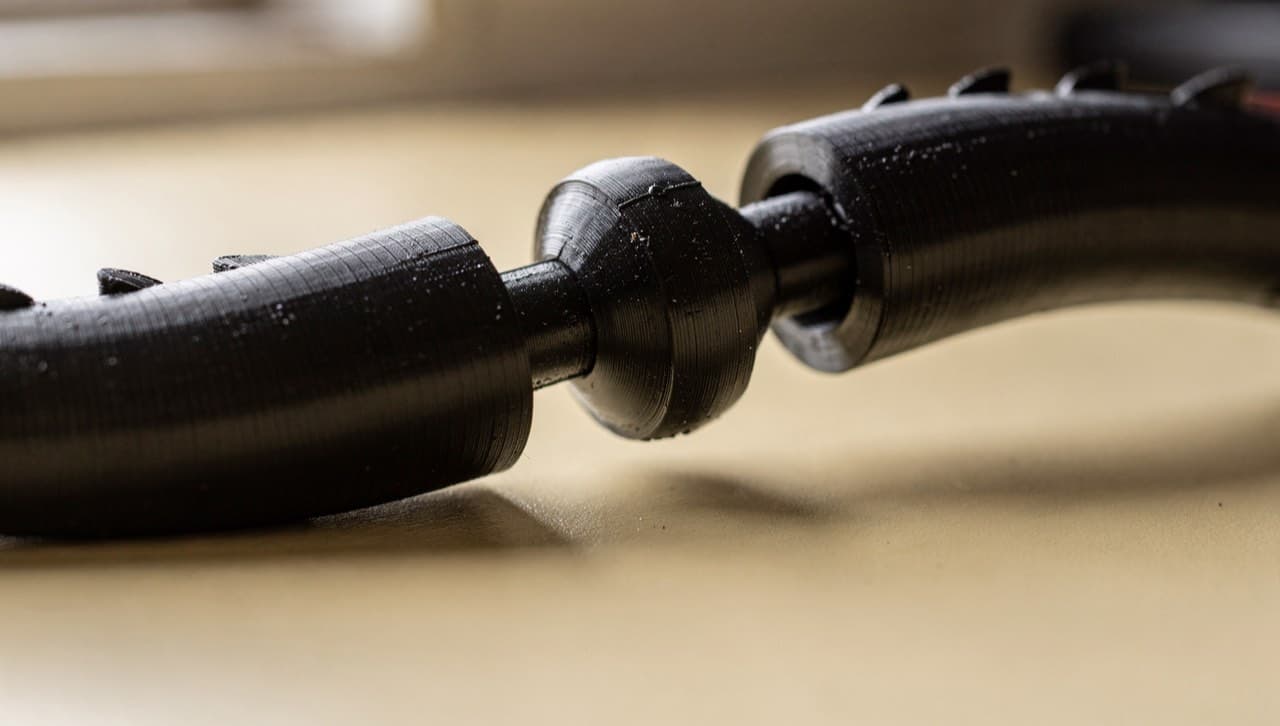
The articulated dragon is the catalog item that makes most first-time buyers do a double-take. It comes off the printer in one piece, but every joint is already movable — head to tail, 28 articulated segments, no assembly required. Customers reasonably ask: how is that possible without glue or post-assembly?
The answer is print-in-place mechanism design, a small category of 3D-printable parts engineered so that movable joints form during the print rather than after. This guide walks through what makes it work, with the dragon as the worked example.
The basic trick
A print-in-place hinge depends on three things lining up:
- Two parts of the same continuous print, separated by a tiny air gap. The slicer treats them as one model (so they print in one pass) but the gap means they don't fuse together.
- The gap is bigger than the printer's "elephant's foot" (the first-layer squish bulge) but smaller than the layer height — typically 0.3–0.4 mm.
- The geometry of the joint is a captured shape: a ball-and-socket, an interlocking loop, or a hinge pin enclosed inside a sleeve. The two parts can pivot around each other but can't separate.
When the print finishes, the two parts of the joint are physically separated by the gap. They didn't fuse during printing because the gap was always there. The captive geometry keeps them connected even though they aren't bonded.
The dragon, specifically
The articulated dragon uses a ball-and-socket joint repeated 28 times along the body. Each segment has a hemispherical socket on one end and a ball on the other; the ball of segment N drops into the socket of segment N+1. The print produces the entire chain — head, 26 body segments, tail tip — in one continuous part.
The two design decisions that make this work on our printer:
Gap clearance: 0.35 mm. Smaller and the joints would fuse; larger and the ball would rattle loose from the socket. 0.35 mm has worked reliably across PLA and PETG; for TPU we'd need to bump it to 0.45 mm because TPU's softer extrusion fills gaps more readily.
Print orientation: standing on the tail. The dragon prints vertically, with the tail tip on the bed and the head at the top. This matters for two reasons:
- The joint gaps are horizontal in the model (perpendicular to the body axis), so they end up parallel to the print bed — which means the slicer's bridging algorithm doesn't have to span them. The gap is just two layers' worth of clean separation, no support needed.
- Layer lines on the visible surfaces (the dragon's sides) run vertically, parallel to the silhouette. This makes the layer banding less visually distracting than a horizontal print orientation would.
The tradeoff: vertical orientation requires print supports under the dragon's outstretched limbs (front legs, wing tips). The supports take 8 minutes to print and 3 minutes to remove. We absorb that in the catalog price.
Why this design instead of multi-part assembly
The obvious alternative is to print each segment separately and assemble afterwards. We don't do this for a few reasons:
- Print-in-place is faster end-to-end. 28 separate prints would mean 28 bed sessions, 28 first-layer calibrations, and assembly time. The single-print version takes 4.5 hours and ships sandedonly.
- Tolerance compounding. Each assembled joint introduces fit slop. By the 28th segment the chain would be visibly loose. A print-in-place chain is tight at every joint because each joint shares its tolerance with the same printer setup.
- No glue. Glue between PLA parts is reliable for static joints (the right glue is cyanoacrylate or epoxy) but bad for joints that move — the glue creeps into the gap and locks the joint.
The downside is that print-in-place designs are slower to design and harder to iterate. The articulated dragon went through five revisions before the joint clearance settled at 0.35 mm.
Other print-in-place candidates
Once you have the technique down, it generalises:
- Print-in-place hinges for boxes and lids. Same principle, simpler geometry. A 20 mm box hinge prints in under 30 min.
- Snap-fit cantilevers that pre-load on print. The hinge is part of the cantilever beam; the spring tension comes from the print itself.
- Chain links — the same ball-and-socket pattern as the dragon, but in a longer loop. We've printed a 20-link decorative chain as a one-off for a customer; took 2 hours and came off the bed as one continuous, fully-flexible chain.
- Whistles, fidget toys, push-button mechanisms. Anything where the action is a constrained pivot or slide.
If you've got a design that would benefit from print-in-place geometry — and aren't sure whether it's printable — sketch it and send it through the custom-quote intake. The first question we'll ask is "what's the smallest moving gap?" If it's larger than 0.35 mm, the answer is almost always yes.